A little less searching.
A little more care.
One Inheritance is the app I’m building for a question that reaches beyond software: would the people closest to you know where to begin?
- The work
- Independent product
- Available on
- iOS and Android
- This account
- Product and design decisions
01 / The problem
The information exists. The map often doesn’t.
An account in one app. A policy in an inbox. A document in a drawer. A responsibility that only one person remembers. Each item may be perfectly well organised on its own, while the people who would need it have no idea it exists.
I built One Inheritance to give those things a place together, and to connect them with the people they matter to. The work includes practical records, recurring responsibilities and personal messages. A family needs more than a list of balances.
The product has two jobs: help someone prepare today, and make the receiving side understandable before it is needed. Both have to work for people who may find the subject difficult to approach.
02 / The decisions
Build around what someone can understand.
Use the language of everyday life.
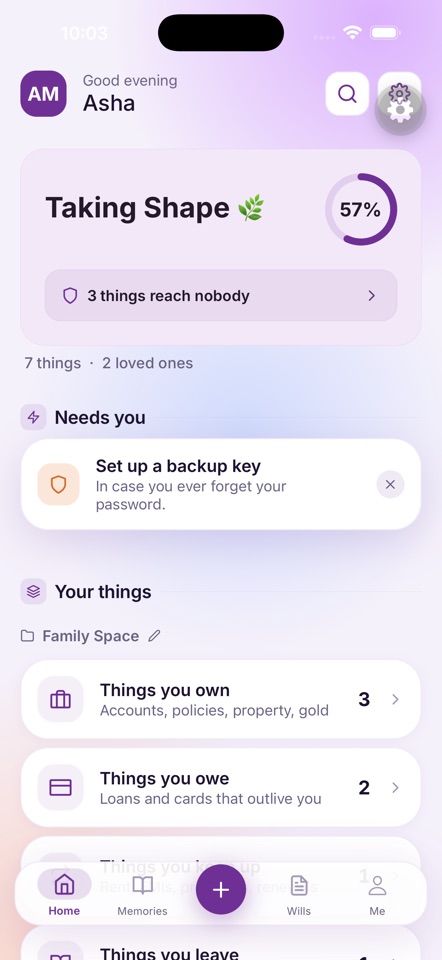
The overview groups records as things you own, owe, keep up and leave. That makes room for a loan or a renewal alongside an account. The tradeoff is that familiar words still need precise fields underneath them; a useful label is only the beginning.
Make missing assignments visible.
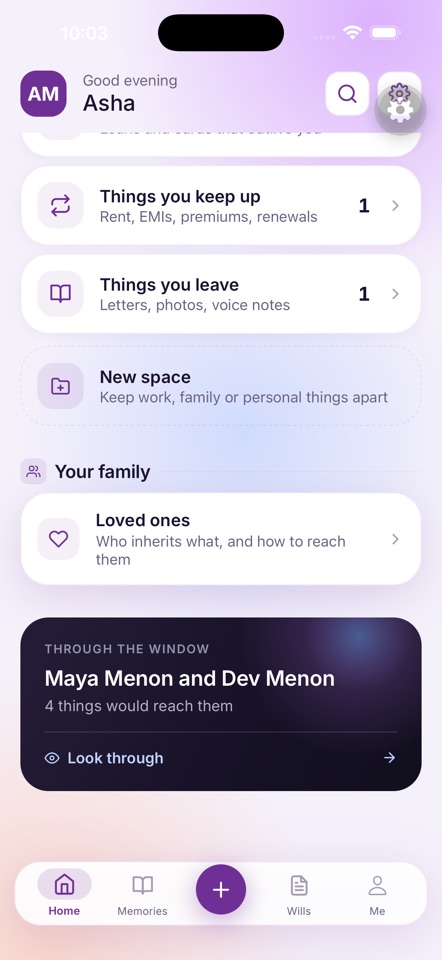
An item can exist without reaching anyone. The overview calls attention to those gaps, while the family view shows what has been connected to a loved one. A progress indicator is a prompt to review the plan; it cannot certify that a family is fully prepared.
Give the receiving side its own view.
“Through the window” makes the other person’s perspective part of preparation. It lets someone inspect the intended result. The distinction between a preview and actual access must stay clear throughout the experience.
Treat handover as a process.
The published product flow separates reminders, notification, certificate review and identity verification. A missed check-in starts a process; it is not itself permission to open the records. That adds operational responsibility and more states to explain, but those distinctions are central to the product.
Explain privacy with its boundaries.
Vault content is encrypted on the device before upload. Account metadata is handled separately, and controlled key escrow supports the handover process. The product’s security model ↗ is where those controls and their limits belong.
03 / Inside the app
Three screens. One connected idea.
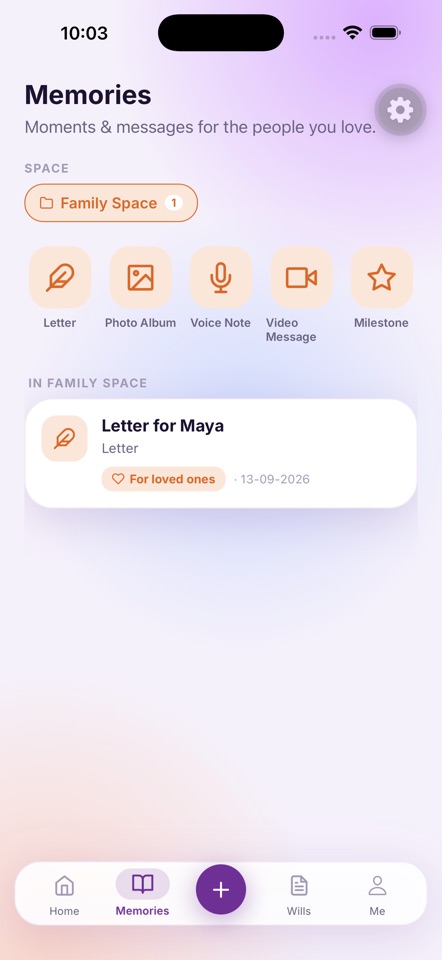
Start with the records, look at who they reach, and leave room for the personal things. These are public App Store screenshots, with the listing’s demonstration names and figures.
Public App Store screenshots
Select the image to view it in full.
A closer look / 01
A record needs somewhere to go.
The overview brings together what you own, owe and keep up. It also calls out items that have not been assigned to anyone. Adding a record is one step; making it useful to someone else is another.
If you added one account today, would you know what to do next?
This walkthrough explains the published screens. It does not create records or grant access to the app.
04 / Lessons in the design
Completeness is a relationship.
The most useful question changes from “have I added this?” to “could the right person make sense of it?” That connects the record, the instructions and the person receiving them. The interface needs to make all three visible.
A second lesson is to distinguish every reassuring signal from a guarantee. A preparation score, a preview and a verification stage each mean something different. Clear wording matters as much as the screen that contains it.
Finally, personal messages deserve the same care as practical records. The Memories screen gives them their own place, while keeping them connected to the larger purpose of the app.
The open question is how clearly people understand the flow when they try it for themselves. That is what I want the next round of feedback to help answer.
05 / Still learning
Where would you hesitate?
I’d like to hear which part of this explanation feels clear, and which part needs more work. Would you know what to add first? Is it clear what your loved one could eventually receive, and when?
Screens and product information checked against the App Store listing and published product walkthrough on 30 September 2026. Store artwork may change separately from app releases.